Apps Script + Google Spreadsheets = Lightweight admin area
August 25, 2025
Recently, a colleague of mine showed me something very pragmatic: how to create a simple admin area where non-technical stakeholders can add, edit, and remove data, and have that data sent to a backend as JSON with a single click. So the data is stored in a spreadsheet, which stakeholders are already familiar with. They can edit it as usual, and there is nothing new to learn on their part. Good.
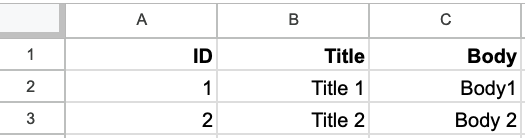
The magic lies in the script behind the spreadsheet, which uses Apps Script.
Go to Extensions -> Apps Scriptand paste the following:
function onOpen() {
  SpreadsheetApp.getUi()
    .createMenu('JSON Export')
    .addItem('To JSON', 'toJson')
    .addToUi();
}

function toJson() {
  const sheet = SpreadsheetApp.getActiveSpreadsheet().getActiveSheet();
  const data = sheet.getDataRange().getValues();
  const headers = data.shift();
  const jsonArray = data.map(row =>
    Object.fromEntries(headers.map((h, i) => [h, row[i]]))
  );
  const prettyJson = JSON.stringify(jsonArray, null, 2);
  const htmlContent = `<pre>${prettyJson}</pre>`;

  SpreadsheetApp.getUi()
    .showSidebar(HtmlService.createHtmlOutput(htmlContent).setTitle('Sheet to JSON'));
}
The onOpen function adds an item to the top menu that looks like this:

When clicked, you can see the result in a sidebar:

You can then make an HTTP call to your backend to persist the data. Pretty neat.